
Hired for Agents
For recruiting agencies
Interview scheduling in as few steps as possible
Candidates just invite Hired to the times they've held in their own calendar. You share those times with the company, the company books one, and the candidate approves it with one tap.
Scheduling is offered first to agencies in our pilot.
The demo needs no sign-up. All data is fictional and nothing is saved.
Scheduling today versus with Hired
Today
6 steps
Candidate to Their calendar:
Holds open times in their calendar
Candidate to You:
Emails the times they're free
You to Company:
Copy those times into a new email
Problem: Copying times by handProblem: Typos in dates, days and times
Company to You:
Replies with a time that works
You to Candidate:
Check the time is still free
Candidate to You:
"That time is already gone"
Problem: Times fill up while everyone waits
Back to the first step
With Hired
3 steps
Candidate to Hired:
Holds open times in their calendar and invites Hired; the times show up in your view
Slot: Open
You to Company:
Shares those times as a slot list or booking link
Slot: Shared
Company to Candidate:
Books a time; the candidate approves with one tap
Slot: Confirmed
- Nothing to retype
- No double booking across companies
- Confirmed inside Hired, in as few steps as possible
From a held time to a confirmed interview
It starts in the candidate's calendar app, passes through you, the company and the candidate in Hired, and the confirmed interview comes back to the candidate's calendar.
Candidate
Calendar app (Google Calendar, etc.)
Holds open times and invites Hired
You (agent)
Hired
Pick the times to share with the company
Hiring company
Hired booking page
Picks a time that works and books it
Candidate
Hired
Approves the booking with one tap
Candidate
Calendar app (Google Calendar, etc.)
The calendar invite for the confirmed interview arrives
How it works
- 1
The candidate invites Hired to the times they've held
Candidates block interview times in their own calendar and invite Hired. Those times appear in their job search calendar. Hired never reads the rest of their calendar.
Demo screen · fictional data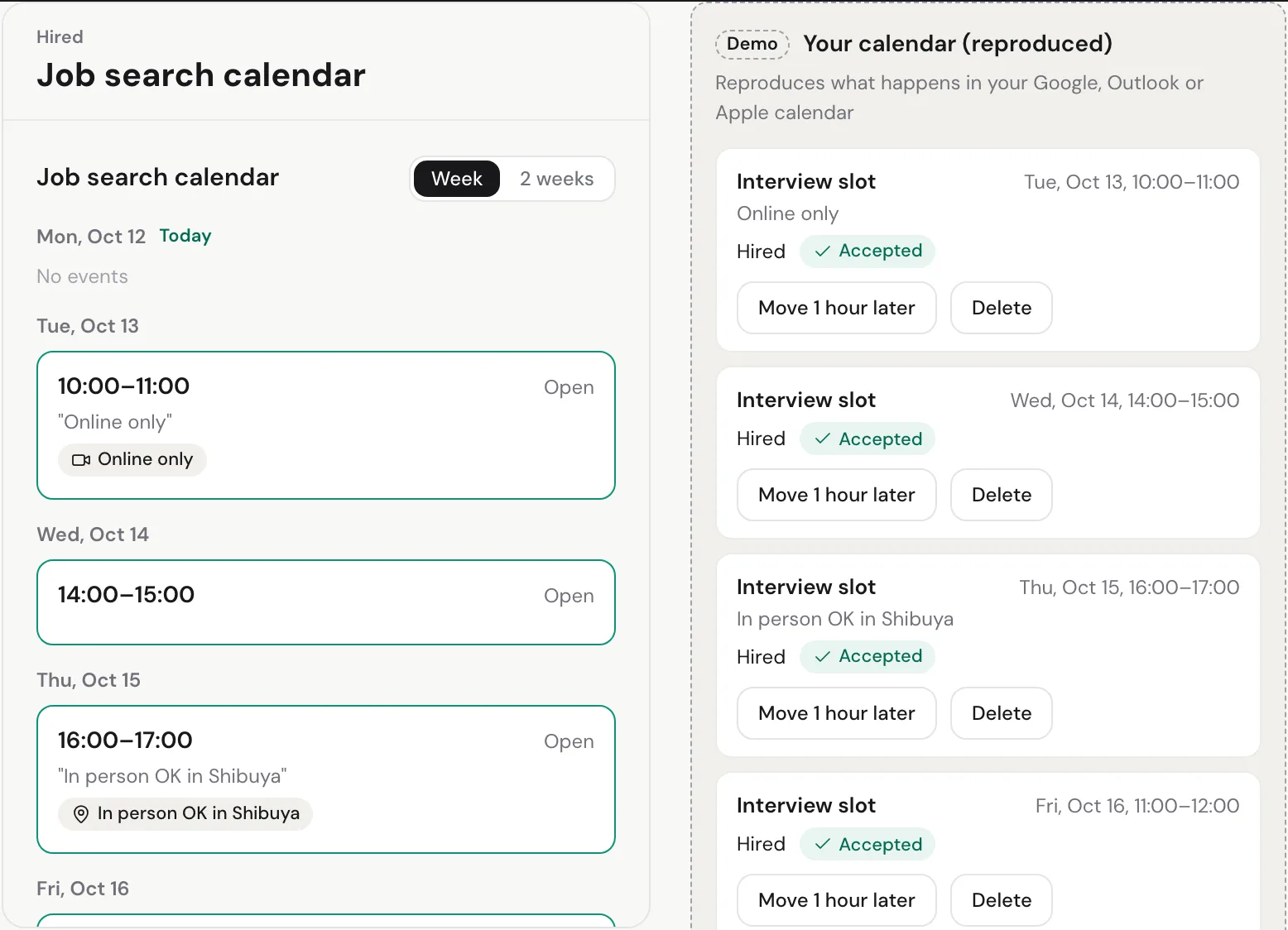
- 2
Share the times with the company
Paste a list of open times into your email, written in the company's language and time zone, or send the hiring team a booking link. They can book without an account.
Demo screen · fictional data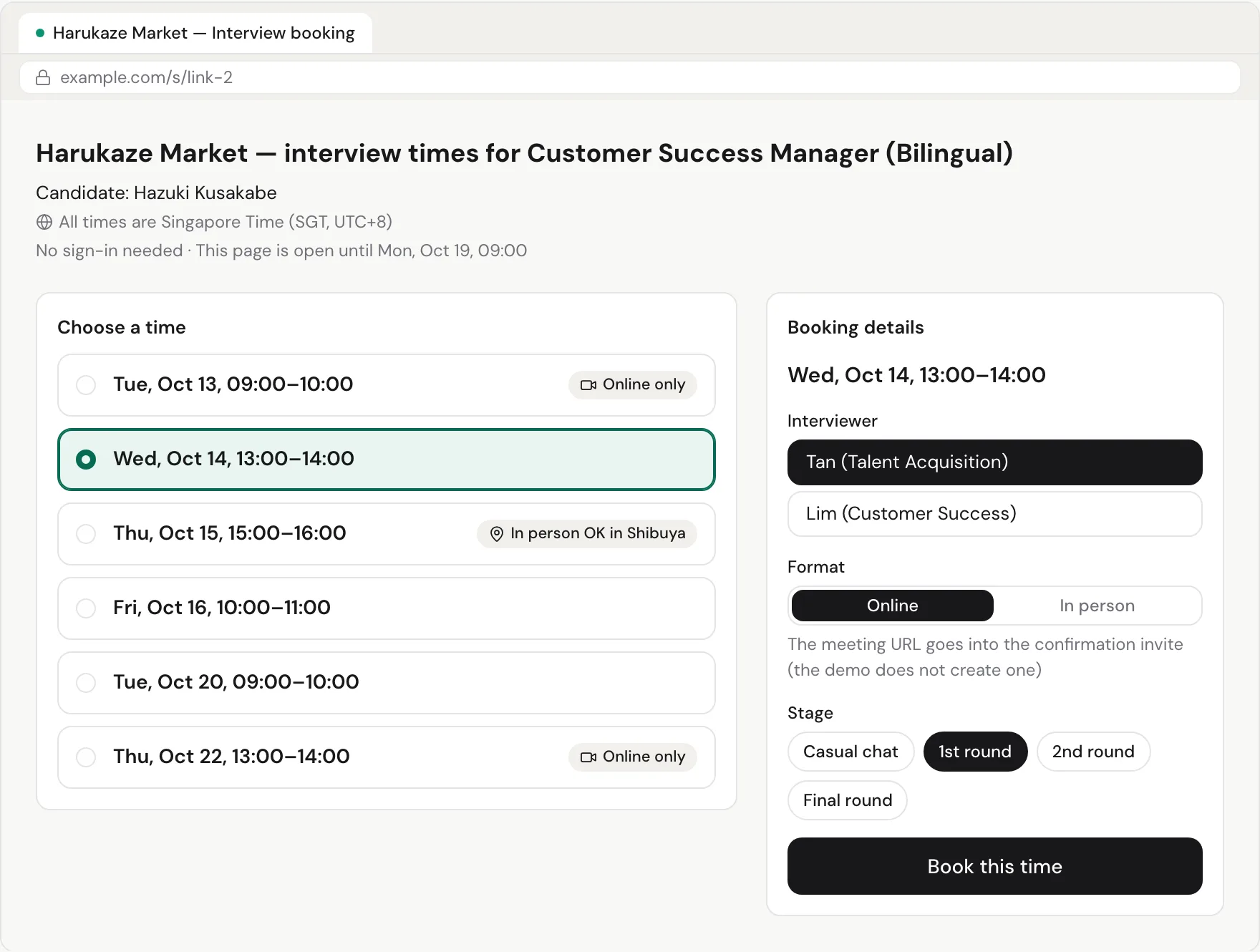
- 3
The company books, the candidate approves
When the company books, the candidate approves with one tap on their phone. Once it's confirmed, the candidate and the interviewers get a calendar invite, and you can see which other times are free to release.
Demo screen · fictional data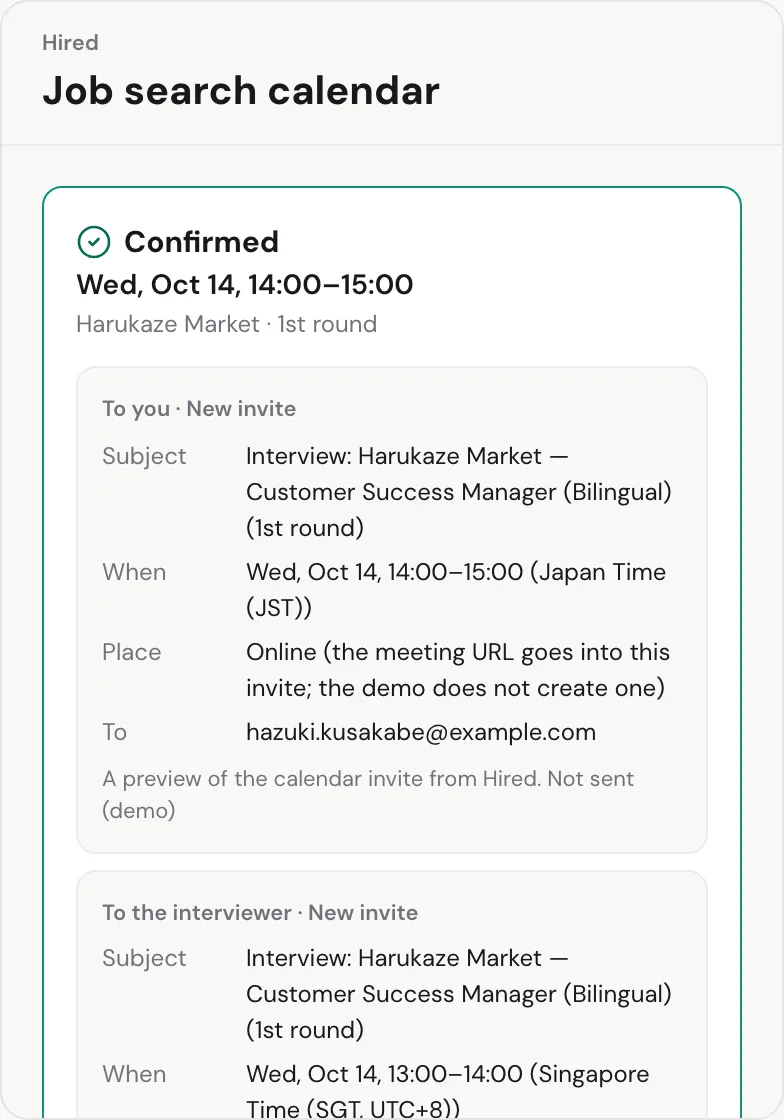

Screens from the demo. All data is fictional; the demo shows invite previews and sends nothing.
Problems Hired solves
Nothing to retype, so no copying errors
You share the candidate's own times, so there are no dates, days or times to retype.
No double booking across companies
Once one company books a time, other companies no longer see it. Times that clash with interviews you can already see are left out of what you share.
See at a glance which scheduling has stalled
The scheduling board shows where each candidate and job stands, from waiting for slots to confirmed, and flags scheduling that has stopped moving.
Time zones and language, set for each company
Set each company's language (English or Japanese) and time zone, and the slot list and booking page show times in their language and their time zone.
Privacy
Hired only sees what it's invited to
Of the five events in the candidate's calendar, only the two interview slots they invited Hired to reach Hired. The company's screen shows only those open times, with no other companies or events.
- Hired receives only the events a candidate invites it to. It never accesses the rest of their calendar.
- The company sees only that candidate's open times and what it needs to book. Other companies' names and schedules are never shown.
- The company never sees other agencies' scheduling or the candidate's other interview processes.
AI prep for your candidates, too
Beyond scheduling, Hired helps your candidates prepare.
For candidates · Available now
AI CV Analysis
Free CV feedback with no sign-up, plus tailoring to a job description (limits depend on the plan).
For candidates · Available now
AI Interview Preparation
Likely questions for a company and role, free with no sign-up. In-depth prep for each opportunity is part of Premium, and mock interviews come with Basic and Premium.
For you · Invite-only
Workspace and CSV import
Import candidates and jobs from a CSV. AI reads only the headers and the first five rows, and you confirm before anything is saved.
Candidates choose and pay for their own plan. See candidate pricing
How getting started works
- 1
Try the demo
Switch between the candidate's, your and the company's screens and go all the way to a confirmed interview.
- 2
Talk to us
Tell us how you schedule interviews today. We explain the terms to each early partner individually.
- 3
Pilot with your candidates
Use scheduling on real interviews with candidates who start using Hired through your agency.
Questions recruiters ask
Which calendars does it work with?
Any calendar that can send invitations, such as Google Calendar or Outlook. Candidates just add Hired's address as a guest on the times they've held.
What does the hiring company need?
Nothing. The booking link opens without an account, and for companies that prefer email, you can send a list of open times instead.
Can you see a candidate's whole calendar?
No. Hired receives only the events a candidate invites it to. You see the invited times and the conditions read from them, such as "online only". The company sees only that candidate's open times and what it needs to book.
Which candidates can I use it with?
Candidates who start using Hired through your agency.
When can I start using it?
We're offering scheduling to agencies in our pilot first, and we'll let you know the timing individually. You can try the full flow, up to a confirmed interview, in the demo.
Does it cost anything?
Agency pricing and terms aren't set yet. We explain them to each early partner individually. Candidates use Hired's own plans for the AI tools: CV analysis and the interview-question tool are free with no sign-up, and the other AI tools need the Basic or Premium plan.
Do I have to replace my ATS or CRM?
No. Keep managing candidates in your current ATS, CRM or spreadsheets. You can start with scheduling alone.
Is Hired a recruitment agency or a job board?
No. Hired is software. It doesn't introduce candidates to employers, doesn't pick or rank candidates for your jobs, and has no pricing tied to whether a candidate is hired.
Is the demo real data?
No. Every company, job, candidate and interview in the demo is fictional. It sends no calendar invites or emails, saves nothing, and needs no account.
What happens to the candidate data I import?
Only members of your agency can see it. It isn't shown on the candidate's own screens or to any other recruiter or agency. Candidates who haven't given consent are deleted automatically 30 days after import. When you delete a record, it moves to the trash and is permanently deleted after 30 days. To identify the columns of your file, we send only the headers and the first five rows (up to 100 characters per cell) to Anthropic's Claude, and under Anthropic's API terms this isn't used to train models.
See scheduling for yourself
Switch between the candidate's, your and the company's screens and go all the way to a confirmed interview. Then talk to us about joining the pilot.
Or email us directly: info@hired-app.com